In 1995, a “browser” was a piece of software with one job: fetch an HTML file over HTTP and paint text and images onto a canvas. Thirty years later, that same category of software runs Figma’s real-time collaborative canvas, decodes 4K video, simulates physics in WebGL/WebGPU games, and executes gigabytes of JavaScript per session — often outperforming the native desktop applications it replaced. This transformation didn’t happen by accident. It happened because a handful of engineering teams, fighting for market share, were forced to solve operating-system-grade problems: process isolation, just-in-time compilation, GPU-accelerated compositing, and transport-layer protocol redesign.
This article is a systems-level teardown of how the modern browser — specifically the Chromium lineage that now powers Chrome, Edge, Opera, Brave, and Arc — became, for all practical purposes, an operating system running inside your operating system.
1. From Netscape to Chromium: The Browser Becomes an OS
The First and Second Browser Wars
The First Browser War (1995–2001) pitted Netscape Navigator against Microsoft’s Internet Explorer. Microsoft’s decision to bundle IE directly into Windows — free, pre-installed, and deeply integrated with the OS shell — was a distribution advantage Netscape’s licensing-based business model could never match. By 2002, IE commanded over 90% of the market, Netscape’s codebase was open-sourced as the Mozilla project, and web innovation effectively stalled for half a decade under IE6’s stagnant rendering engine.
The Second Browser War (2004–2008) was Mozilla Firefox’s counterattack, built on the Gecko rendering engine. Firefox reintroduced competitive pressure around standards compliance, tabbed browsing, and extensibility, clawing back meaningful market share from a complacent IE.
Then, in September 2008, Google shipped Chrome. It didn’t just bring a faster JavaScript engine (V8, covered below) — it brought a fundamentally different process model for what a browser tab even was. Chrome’s rendering engine started as a fork of Apple’s WebKit (itself derived from KHTML); in 2013 Google forked WebKit into Blink, and Blink has since become the de facto substrate of the web. Microsoft Edge abandoned its own EdgeHTML engine for Blink in 2020. The result is a near-monopoly often called Chromium hegemony: the majority of consumer browsers today share the same rendering core, differing mainly in UI chrome and privacy defaults.
Why this matters for engineers: Because Blink/V8 behavior is now the de facto web standard rather than just a standard implementation, understanding its internals — not just the W3C spec text — is often the difference between code that merely works and code that performs.
From Document Viewer to Application Runtime
The technical demands placed on a browser scaled by orders of magnitude as the web shifted from static documents to applications: AJAX (2005) turned pages into stateful clients that fetched data without reloading; the <canvas> and later WebGL APIs turned the browser into a GPU-accessible rendering target; Node.js proved JavaScript could run server-side at scale, which fed back into browser JS engine investment; and Progressive Web Apps blurred the line between “website” and “installed application” entirely.
A browser that can run Google Docs, a multiplayer 3D game, and a live video call simultaneously in different tabs is not a document viewer. It is a multi-tenant runtime, and it needed an architecture to match.
Chrome’s Architectural Win: Multi-Process Everything
Pre-Chrome browsers were largely single-process, multi-threaded applications. Every tab, every extension, and the browser’s own UI shared one address space. A single malformed <script> tag, a buggy plugin, or a renderer bug could take down every open tab simultaneously — and because everything shared memory, a rendering bug in one tab was a potential security bridge into another tab’s data.
Chrome’s founding architectural decision was to split the browser into cooperating OS-level processes:
- Browser Process — the privileged orchestrator. Owns the UI (address bar, bookmarks, tab strip), manages disk cache, and is the only process with unrestricted access to the network and filesystem.
- Renderer Processes — one (or more) per tab/site, running Blink and V8. These are deliberately sandboxed: a renderer process cannot directly touch the filesystem, cannot make arbitrary syscalls, and must ask the Browser Process via inter-process communication (IPC) for anything privileged.
- GPU Process — a single shared process that owns the graphics context and performs compositing, isolating fragile, crash-prone GPU driver code from both the browser and renderers.
- Network Process, Utility Processes, Extension Processes — further decomposition for parsing, audio, and third-party extension code.
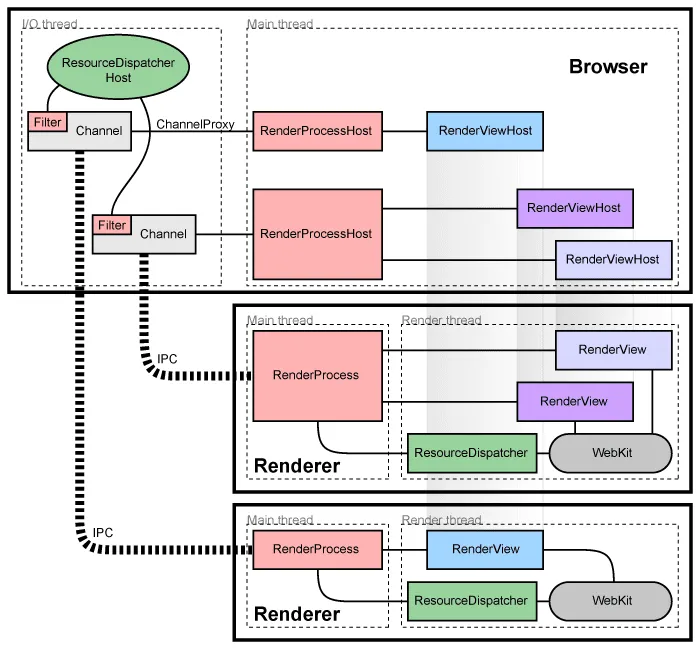
Figure 1: Multi-process architecture of Chromium. The main Browser Process orchestrates UI and network operations while communicating with isolated, sandboxed Renderer Processes via Inter-Process Communication (IPC) channels to enforce security boundaries.
The immediate, visible win was crash containment: one tab could crash — the infamous “Aw, Snap!” page — without taking down the other twenty tabs open in the window. The deeper win was security: because renderer processes are sandboxed and treated as untrusted, a remote code execution bug in Blink’s HTML parser no longer hands an attacker the keys to your whole machine; it hands them a sandboxed process with almost no privileges, which then has to find a second, separate sandbox-escape bug to do real damage.
Site Isolation: Post-Spectre Hardening
Multi-process architecture alone wasn’t enough. Originally, Chrome grouped tabs by process somewhat loosely (often per-tab, but not strictly per-origin), meaning an <iframe> from evil.example embedded inside trusted-bank.example could still share a renderer process — and therefore share an address space — with its parent page.
The 2018 disclosure of the Spectre speculative-execution side-channel vulnerability changed the calculus entirely. Spectre demonstrated that a malicious script could potentially read arbitrary memory within its own process by exploiting CPU speculative execution — meaning process-level sandboxing was no longer sufficient if hostile and trusted code shared a process. Chrome’s response was Site Isolation: every distinct site (roughly, scheme + registrable domain) gets its own renderer process, even for cross-origin iframes nested inside another page. Cross-process communication between a page and its iframes is mediated entirely through IPC, so there’s no shared memory for a Spectre-style read to exploit.
The cost of isolation: Site Isolation is not free. A page with a dozen cross-origin ad and analytics iframes can spin up a dozen additional renderer processes, each with its own baseline memory overhead (V8 heap, Blink’s DOM structures, IPC buffers). This is the primary reason Chrome’s per-tab RAM footprint is often criticized — it is a direct, deliberate trade-off of memory for security and stability.
2. The V8 Engine: Making a Dynamic Language Fast
JavaScript was designed in ten days in 1995 as a lightweight scripting glue language. It is dynamically typed, garbage collected, and permits object shapes to mutate at runtime — none of which are properties that lend themselves to fast execution. Google’s V8 engine, first shipped with Chrome, is the reason JavaScript now competes with statically compiled languages on real-world workloads. It does this through a three-tier pipeline: a fast-starting interpreter, a mid-tier compiler that closes the latency gap, and a top-tier speculative optimizing compiler.
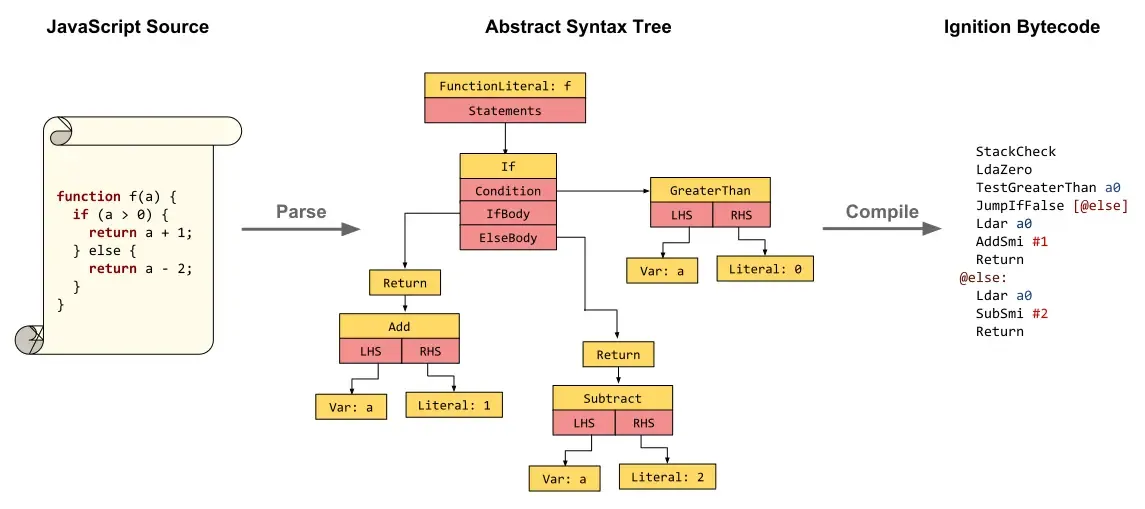
Figure 2: The parsing and bytecode generation pipeline in V8. JavaScript source code is parsed into an Abstract Syntax Tree (AST), which the Ignition interpreter then compiles directly into register-based bytecode before execution.
Ignition: The Bytecode Interpreter
When V8 first receives your JavaScript, it doesn’t compile straight to machine code. The parser builds an abstract syntax tree (AST), and Ignition, V8’s interpreter, compiles that AST into a compact, register-based bytecode. Bytecode is far smaller than equivalent machine code and can be generated almost instantly — critical for page-load performance, since users are waiting on that first paint.
Ignition executes this bytecode directly, and critically, it also profiles execution as it runs: which functions are called frequently, which call sites see stable argument types, and which branches are hot. This profiling data is the fuel for the tiers above it.
Maglev: Bridging the Latency Gap
Ignition’s bytecode gets code running almost instantly, but an interpreter pays a per-instruction dispatch cost on every single execution — fine for a function called twice, ruinous for one called inside a hot loop tens of thousands of times. The obvious fix is to compile straight to native machine code. But V8’s top-tier compiler, TurboFan, is deliberately heavyweight: it builds a full graph representation of the function and runs it through a long pipeline of iterative optimization passes — inlining, escape analysis, range analysis, load/store elimination — that produce excellent machine code at the cost of real compilation time and memory. Firing TurboFan on every function the moment it looks merely “warm” would waste enormous CPU budget compiling code that might only execute a few hundred more times before the page navigates away.
Maglev exists to close that gap. Introduced as V8’s mid-tier JIT compiler, it sits directly between Ignition and TurboFan in the pipeline. Rather than building and iteratively rewriting a heavyweight graph, Maglev performs a single-pass compilation directly over Ignition’s bytecode, constructing a Static Single Assignment (SSA) representation — where every variable is assigned exactly once, simplifying data-flow analysis — and lowering it straight to native machine code in one linear pass, skipping the rounds of iterative graph rewriting TurboFan relies on. The output isn’t as aggressively optimized as TurboFan’s, but it is genuine native machine code, compiled in a fraction of the time, and it comfortably outruns interpreted bytecode.
This gives V8 a graduated on-ramp: Ignition executes a function from its very first call with effectively zero compile latency; once the function proves merely warm, V8 tiers it up to Maglev for cheap, fast native code; and only once it proves it’s genuinely and durably hot does V8 make the much larger investment of tiering it up to TurboFan for maximal optimization.
Why tiering exists at all: Compilation is not free — it competes with the rest of the page for CPU time. A pure interpreter wastes cycles re-dispatching the same hot instructions millions of times; a pure optimizing compiler wastes cycles deeply optimizing code that never runs long enough to earn back its own compilation cost. Maglev’s entire reason for existing is to make the middle of that trade-off curve cheap, so TurboFan’s expensive optimizations are reserved only for code that has statistically proven it deserves them.
TurboFan: The Optimizing Compiler
Once a function proves it isn’t just warm but durably hot — called or looped over enough times that TurboFan’s heavier compilation cost will pay for itself many times over — V8 hands it to TurboFan, the top-tier optimizing JIT compiler. TurboFan takes the accumulated type feedback from Ignition and Maglev and generates the most aggressively optimized native machine code V8 can produce, specialized for the types it has actually observed — for example, assuming a function’s parameter is always a small integer, and eliminating the generic type-checking and boxing/unboxing overhead that a fully general implementation would require.
This is fundamentally speculative optimization: TurboFan bets that past type behavior predicts future type behavior. If that bet is later violated — a function that always received integers suddenly receives a string — V8 must deoptimize, discarding the specialized machine code and falling back to a lower tier — Maglev’s code, or ultimately Ignition’s bytecode — before potentially re-optimizing later with broader assumptions. Frequent deoptimization is one of the most common, and most invisible, sources of JavaScript performance regressions.
Deoptimization traps: Polymorphic call sites (a function invoked with many different argument shapes), mixing types within a single array, and modifying an object’s structure after construction are among the most common ways to force V8 to abandon optimized code paths mid-execution.
Hidden Classes: Faking Static Structure
Here is the core problem: in a statically typed language, the compiler knows at compile time exactly where each object property lives in memory, so obj.x compiles down to a fixed memory offset read. In JavaScript, objects are dynamic dictionaries — properties can be added or removed at any time — so a naive implementation would require a hash-map lookup for every single property access, which is disastrously slow at scale.
V8’s solution is Hidden Classes (internally called Maps, not to be confused with the JS Map type). Every JavaScript object is secretly associated with a hidden class describing its current “shape”: which properties it has, and at what offset each one lives. When two objects are constructed with properties added in the same order, V8 recognizes they share the same shape and assigns them the same hidden class — meaning property access can now be compiled down to a direct offset read, just like a static language.
The moment an object’s shape changes — a new property is added, or a property is deleted — V8 must transition it to a new hidden class. If two constructors build logically similar objects but assign properties in different orders, V8 generates entirely different hidden-class transition chains for them, defeating this optimization:
Inline Caching: Remembering the Last Shape Seen
Hidden classes solve how a property lookup happens; Inline Caching (IC) solves how fast it happens at a specific point in your code. Every property access site (a “call site,” e.g. the specific line obj.x) maintains a small cache remembering which hidden class it saw last time and the resulting memory offset. On the next execution of that same line, V8 checks: “is this object’s hidden class the same as last time?” If yes, it skips the lookup entirely and jumps straight to the cached offset.
Inline caches move through three states:
- Monomorphic — the call site has only ever seen one hidden class. This is the fastest possible path.
- Polymorphic — the call site has seen a small, bounded number of distinct hidden classes (V8 caches several and checks each). Still reasonably fast.
- Megamorphic — the call site has seen too many distinct shapes to usefully cache. V8 gives up on the IC fast path and falls back to a generic, much slower property lookup.
This is precisely why libraries and style guides urge consistent object construction (fixed property sets, consistent insertion order, avoiding delete): it’s not superstition, it’s keeping inline caches monomorphic.
3. The Critical Rendering Path: From Bytes to Pixels
Once V8 has executed your scripts, the browser still has to turn a document plus styles into an actual image on a physical display, ideally 60 (or 120) times per second. This pipeline — the Critical Rendering Path — is where network bytes become pixels.
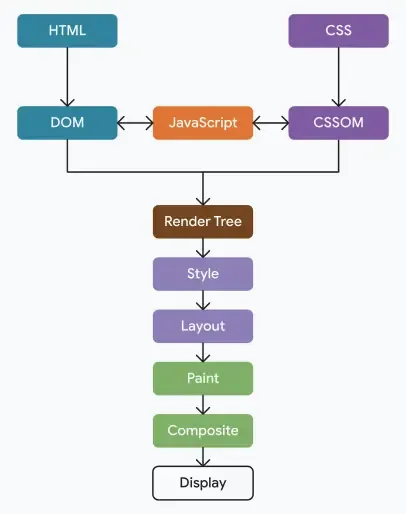
Figure 3: The Critical Rendering Path pipeline. The browser parses HTML and CSS into the DOM and CSSOM trees, merges them into a Render Tree, and executes Layout, Paint, and Compositing passes to render the final frame on screen.
DOM and CSSOM Construction
As HTML bytes arrive, Blink’s HTML parser tokenizes them incrementally and builds the DOM (Document Object Model) tree — a live, structured representation of every element and text node. Parsing is streaming and incremental by design: the browser doesn’t wait for the entire document before starting to build the tree, which is why a preload scanner runs ahead of the main parser, spotting <img>, <link>, and <script> tags early to kick off network requests before the parser even reaches them.
In parallel, CSS — whether from <style> blocks or linked stylesheets — is parsed into the CSSOM (CSS Object Model), a tree of style rules with computed specificity and cascade resolution. CSSOM construction is render-blocking: because any later stylesheet rule could in principle override an earlier one, the browser cannot safely start painting until it has the complete CSSOM (this is also why the classic performance advice is to keep stylesheets small and load them early).
Render Tree, Layout, and Paint
With DOM and CSSOM available, Blink combines them into the Render Tree: essentially the DOM, but filtered to only the nodes that will actually be visible (display: none elements are excluded entirely, though visibility: hidden elements are included since they still occupy space), annotated with their final computed styles.
The Render Tree only knows what to draw, not where. Layout (sometimes called reflow) walks the tree and computes the exact box-model geometry — position, width, height, margins — for every single node, relative to the viewport. This is inherently a global operation: changing the width of one element can ripple through and shift the position of every sibling and descendant, which is why layout is one of the most expensive stages in the pipeline, and why triggering it repeatedly in a tight loop (layout thrashing, e.g., reading offsetHeight then writing a style in alternating calls) is a classic performance anti-pattern.
Once geometry is settled, Paint rasterizes each visible element into actual pixels — filling in text, colors, borders, shadows, and images — recorded as an ordered list of drawing commands (rectangles, glyph runs, image blits) per layer.
Compositing: Handing Off to the GPU
The final stage, Compositing, is what makes buttery-smooth scrolling and animation possible. Certain elements — those with a CSS transform, opacity transition, will-change hint, <video>, or <canvas> — get promoted onto their own compositor layer, essentially a separate texture. These layers are handed to the GPU Process, which composites them together on a dedicated compositor thread, entirely separate from the main JavaScript/layout/paint thread.
The payoff: animating transform and opacity can skip Layout and Paint entirely and be handled purely by the GPU repositioning pre-rasterized textures, which is why these two properties can hit a smooth 60/120fps even while the main thread is busy running JavaScript. Animating width, top, or left, by contrast, forces a full Layout → Paint → Composite cycle on every single frame, since the geometry itself is changing.
will-change is a scalpel, not a hammer: Promoting an element to its own compositor layer consumes GPU memory (each layer is a full texture). Overusing will-change on many elements can hurt performance by exhausting GPU memory and forcing excessive layer management — it should be applied narrowly, right before an animation starts, and removed afterward.
4. Network Protocols Pushing the Web: HTTP/1.1 to HTTP/3
Rendering fast means nothing if the bytes take too long to arrive. The transport layer underneath the browser has undergone as radical a redesign as the rendering engine itself.
HTTP/1.1 and the Head-of-Line Blocking Problem
HTTP/1.1 is a plain-text, request-response protocol where, strictly, only one request can be outstanding per TCP connection at a time (pipelining — sending multiple requests without waiting for responses — was technically permitted but so poorly and inconsistently implemented across intermediaries that browsers never enabled it by default). To achieve any parallelism, browsers resorted to opening multiple simultaneous TCP connections per origin — typically capped around six — a hack that works but comes with real costs: each connection needs its own TCP handshake and, over HTTPS, its own TLS handshake, and each starts from a slow initial congestion window.
HTTP/2: Multiplexing Over a Single Connection
HTTP/2 replaced HTTP/1.1’s plain-text framing with a binary framing layer, breaking requests and responses into small frames tagged with a stream ID, all interleaved over a single TCP connection. This enables true multiplexing: dozens of requests and responses can be in flight concurrently on one connection, eliminating the need for the six-connection workaround and the redundant handshake overhead that came with it. HTTP/2 also introduced HPACK header compression (since HTTP headers are extremely repetitive across requests to the same origin) and, more controversially, server push (largely abandoned in practice by 2022, as it proved hard to tune correctly and was often outperformed by simpler techniques like <link rel="preload">).
HTTP/2 solved application-layer head-of-line blocking — but it inherited a deeper problem from its transport. TCP guarantees strictly ordered, in-sequence byte delivery. If a single packet is lost anywhere in that one shared TCP connection, every multiplexed HTTP/2 stream stalls, because TCP won’t hand the kernel’s receive buffer up to the application until the missing packet is retransmitted and the byte stream is back in order — even though the lost packet may have belonged to only one of the dozens of active streams. This is transport-layer head-of-line blocking, and no amount of application-layer cleverness can fix it while TCP is the transport underneath.
HTTP/3: Abandoning TCP for QUIC
HTTP/3’s defining decision is radical: it abandons TCP entirely and runs over QUIC, a new transport protocol built on top of UDP. This sounds like a step backward — UDP offers no ordering or reliability guarantees at all — but that’s precisely the point. QUIC reimplements reliability and congestion control itself, at the transport layer, but critically, it does so per-stream rather than for the connection as a whole. If a packet carrying data for stream 4 is lost, only stream 4 stalls waiting for retransmission; streams 1, 2, and 3 continue delivering data to the application uninterrupted. Head-of-line blocking is now scoped to the individual stream that actually lost data, not the entire connection.
QUIC also folds the transport and cryptographic handshakes together. Where TCP + TLS 1.3 historically required a TCP handshake followed by a separate TLS handshake (adding round trips), QUIC integrates TLS 1.3 directly into its own handshake, and for repeat connections to a server the client has recently visited, it supports 0-RTT resumption: the client can send encrypted application data in its very first flight of packets, using cryptographic parameters cached from the prior session — no waiting for a server round trip at all before useful data starts flowing. (0-RTT data carries a theoretical replay-attack risk, which is why servers restrict which kinds of requests, typically idempotent ones, are allowed to use it.)
A further, often underappreciated QUIC feature is connection migration: because a QUIC connection is identified by a Connection ID rather than the traditional TCP 4-tuple (source IP, source port, destination IP, destination port), a client can switch networks — say, from WiFi to cellular data when walking out the door — without tearing down and re-establishing the connection.
| Property | HTTP/1.1 | HTTP/2 | HTTP/3 |
|---|---|---|---|
| Transport | TCP | TCP | QUIC over UDP |
| Multiplexing | None (needs multiple connections) | Yes, single connection | Yes, per-stream |
| Head-of-Line Blocking | Severe (per connection) | Transport-level only (one lost packet stalls all streams) | Eliminated (isolated per stream) |
| Header Compression | None | HPACK | QPACK |
| Handshake | TCP + separate TLS handshake | TCP + separate TLS handshake | Combined transport + crypto handshake |
| 0-RTT Resumption | No | No | Yes |
| Connection Migration | No (tied to IP/port) | No (tied to IP/port) | Yes (Connection ID based) |
UDP isn’t universally welcome: Because QUIC runs over UDP, some corporate firewalls, older middleboxes, and restrictive networks throttle or block it outright, historically having been tuned to prioritize or exclusively expect TCP. Browsers handle this by always attempting HTTP/3 opportunistically while transparently falling back to HTTP/2 over TCP when UDP is unavailable — a graceful degradation path that has to be built into the client, not assumed away.
5. Conclusion: WebAssembly and Closing the Native Gap
Every layer covered so far — sandboxed multi-process architecture, V8’s speculative JIT, the GPU-accelerated rendering pipeline, and QUIC’s low-latency transport — was built in service of one goal: making the browser behave like a first-class application platform. The last major gap was raw computational throughput for the heaviest workloads: video/photo editing suites, CAD tools, full 3D game engines, and scientific computing, where even V8’s optimized machine code carries residual overhead from JavaScript’s dynamic type checks and garbage collection pauses.
WebAssembly (Wasm) closes that gap. It is a compact, binary instruction format designed as a compilation target rather than a language to be hand-written — C, C++, Rust, and Go code can be compiled directly to Wasm modules that run inside the same sandboxed renderer process, at speeds close to native machine code, because Wasm is statically typed and validated ahead of time, sidestepping the dynamic-typing overhead JavaScript engines have to speculate around. Wasm modules share a linear memory buffer with JavaScript and are invoked through thin JS glue code, letting existing native codebases — a physics engine, a video codec, a CAD kernel — be dropped into the browser largely unmodified.
This is how Figma runs a C++ rendering engine in a tab, how AutoCAD and Photoshop ship browser versions with real editing performance, and how Unreal Engine and Unity can target the web as a build platform for playable game demos. Emerging efforts like the WebAssembly System Interface (WASI) are now pushing Wasm’s sandboxed, portable execution model outside the browser entirely, into edge computing and server-side runtimes — turning a technology born to solve a browser performance problem into a general-purpose, secure execution format for computing at large.
Thirty years after Netscape shipped a document viewer, the “browser” is arguably the most sophisticated piece of consumer software most people run: an operating system, in the truest engineering sense, that just happens to render itself inside a rectangle on your screen.
References & Further Reading
- V8 Development Team. Firing up the Ignition interpreter. V8.dev. Technical background on Ignition’s bytecode design and its role in V8’s startup performance.
- V8 Development Team. TurboFan JIT Design. V8.dev. Architectural documentation on V8’s optimizing compiler and speculative optimization model.
- Chromium Project. Site Isolation Design Documents. Chromium.org. Engineering rationale for per-site renderer process isolation following the Spectre disclosure.
- IETF. RFC 9000: QUIC — A UDP-Based Multiplexed and Secure Transport. IETF Datatracker. The formal QUIC transport specification underlying HTTP/3.
- IETF. RFC 9114: HTTP/3. IETF Datatracker. The formal mapping of HTTP semantics onto the QUIC transport.
- web.dev (Google). Critical Rendering Path. web.dev. Reference documentation on DOM/CSSOM construction, layout, paint, and compositing.
- WebAssembly Community Group. WebAssembly.org. Official specification hub and design rationale for the Wasm binary instruction format.
Technical Glossary
| Term | Definition |
|---|---|
| Blink | Google’s HTML/CSS rendering engine, forked from WebKit in 2013, now shared by Chrome, Edge, Opera, and most other Chromium-based browsers. |
| Site Isolation | A Chromium security architecture giving each distinct site its own renderer process, including cross-origin iframes, to defend against Spectre-class memory-read attacks. |
| Ignition | V8’s bytecode interpreter, responsible for fast startup execution and collecting type-feedback profiling data. |
| TurboFan | V8’s optimizing JIT compiler, which generates speculatively type-specialized native machine code for “hot” functions. |
| Hidden Class (Map) | V8’s internal representation of a JavaScript object’s property “shape,” enabling static-language-style offset-based property access. |
| Inline Cache (IC) | A per-call-site cache remembering the last observed hidden class(es), allowing V8 to skip full property lookups on repeat execution. |
| CSSOM | The CSS Object Model — a tree representation of parsed stylesheet rules, combined with the DOM to produce the Render Tree. |
| Compositor Thread | A dedicated thread, separate from the main JS/layout thread, that handles GPU layer compositing for smooth animation independent of main-thread work. |
| Head-of-Line Blocking | A stall condition where the loss or delay of one unit of data blocks delivery of unrelated data multiplexed on the same channel. |
| QUIC | A UDP-based transport protocol (RFC 9000) providing per-stream reliability, integrated TLS 1.3 handshakes, 0-RTT resumption, and connection migration. |
| 0-RTT Resumption | A QUIC/TLS 1.3 feature allowing a returning client to send encrypted application data in its very first packet flight, without waiting on a server round trip. |
| WebAssembly (Wasm) | A statically-typed, sandboxed binary instruction format used as a compilation target for near-native performance inside the browser runtime. |