
The disclosure of the Pegasus spyware campaign by the Parisian non-profit organization Forbidden Stories and Amnesty International marked a major milestone in modern cybersecurity. The investigation revealed that several nation-state actors utilized sophisticated commercial-grade surveillance software developed by the Israeli company NSO Group to target politicians, diplomats, human rights activists, and journalists globally, sharing the findings with prominent outlets like The Washington Post and The Guardian.
Pegasus represents a highly complex class of mobile malware. Once successfully deployed to a target device, it operates silently in the background, harvesting sensitive communications (SMS, WhatsApp, Signal, emails), extracting system logs, recording voice calls, tracking real-time GPS locations, and capturing ambient media through the device’s microphone and camera.
This technical guide analyzes the propagation mechanics of Pegasus and provides a step-by-step walkthrough for performing digital forensics on iOS and Android devices using the Mobile Verification Toolkit (MVT).
Technical Mechanics: The Power of Zero-Click Exploits
Historically, mobile malware infection required some form of victim interaction—such as phishing links, malicious attachments, or social engineering. Pegasus, however, achieved massive success by leveraging zero-click exploits.
A zero-click exploit requires absolutely no user interaction to compromise a device. These attacks typically target system daemons that process incoming data before the user is notified. For example, by sending a specifically crafted iMessage payload or WhatsApp packet, the malware triggers memory corruption vulnerabilities (such as integer overflows or buffer overflows) within low-level operating system rendering libraries (e.g., Apple’s CoreGraphics library processing PDF or JBIG2 images).
The application or daemon crashes silently, executes shellcode with root-level privileges, downloads the main payload, and establishes persistence—all before the target’s phone even rings or displays a notification. These bugs are classified as zero-day exploits because they target vulnerabilities unknown to the software vendor, leaving devices completely defenseless until a security patch is developed and deployed.
Forensic Framework: Mobile Verification Toolkit (MVT)
The Mobile Verification Toolkit (MVT) is an open-source, modular forensic analysis framework designed to acquire and analyze mobile system logs, database records, and system configurations. MVT parses historical system artifacts to identify known Indicators of Compromise (IOCs) matching Pegasus exploitation traces. Known threat signatures and IOC datasets are actively compiled on the AmnestyTech Investigations GitHub.
Prerequisites & Forensic Workbench Setup
While MVT can run on most Debian-based Linux environments, this guide utilizes Kali Linux as the primary forensic workstation.
1. Synchronizing the Forensic Environment
Ensure all system package libraries are fully updated:
sudo apt update
sudo apt upgrade -y
2. Installing Core Dependencies
MVT requires Python 3, package compilers, and USB communication libraries to interface with connected mobile devices:
sudo apt install -y python3 python3-pip libusb-1.0-0 git3. Installing MVT from Source
Download the latest MVT repository, compile the toolkit locally, and update your system shell’s execution paths:
cd ~/Downloads
git clone https://github.com/mvt-project/mvt.git
cd mvt
pip3 install .
To execute the MVT binaries globally, append the local user binary path to your environmental path variable:
export PATH=$PATH:/home/$USER/.local/bin(Make sure to replace $USER with your active Linux system username, or append this command directly to your ~/.bashrc or ~/.zshrc file).
4. Acquiring Amnesty International IOC Signatures
Clone the official Amnesty International Investigations repository, which contains the historical database of verified Pegasus Indicators of Compromise (specifically the .strix2 signatures file):
cd ~/Downloads
git clone https://github.com/AmnestyTech/investigations.git
Digital Forensics on iOS Devices
iOS forensics via MVT analyzes historical database records, SQLite structures, and cached network requests. To perform this, a copy of the target device’s operating system structure must first be acquired.
Data Acquisition: Filesystem Dumps vs. iTunes Backups
There are two primary methods for acquiring iOS forensic data:
- Filesystem Dump: Requires a full jailbreak of the iOS kernel (e.g., utilizing hardware exploits like checkra1n). This method provides absolute read access to the entire root directory, system caches, and raw partitions. However, jailbreaking voids device warranties and can alter the forensic integrity of system files.
- Encrypted iTunes Backup: A non-destructive alternative that maintains system warranty. Crucially, the backup must be encrypted with a local password. Encrypted backups force iOS to export highly sensitive local databases (including Safari history, call logs, SMS message databases, and application data) that are otherwise excluded from plain text backups for security reasons.
Step-by-Step iOS Forensic Walkthrough
- Connect the target iPhone to a workstation and perform an encrypted backup via iTunes (Windows/macOS) or using
idevicebackup2on Linux. - Locate the backup folder, which is named after the device’s Unique Device Identifier (UDID).
- Transfer the UDID folder to your Linux forensic environment (e.g., into your
~/Documentsdirectory). - Generate a decryption target directory and decrypt the backup utilizing MVT:
mkdir -p ~/Documents/decrypted
mvt-ios decrypt-backup -p 'YOUR_DECRYPTION_PASSWORD' -d ~/Documents/decrypted ~/Documents/<UDID_FOLDER_NAME>- Create a target output folder to store the generated forensic reports:
mkdir -p ~/Downloads/output_forensics- Execute the MVT scan engine, comparing the decrypted iOS backup database structures against the verified Pegasus STIX2 indicators:
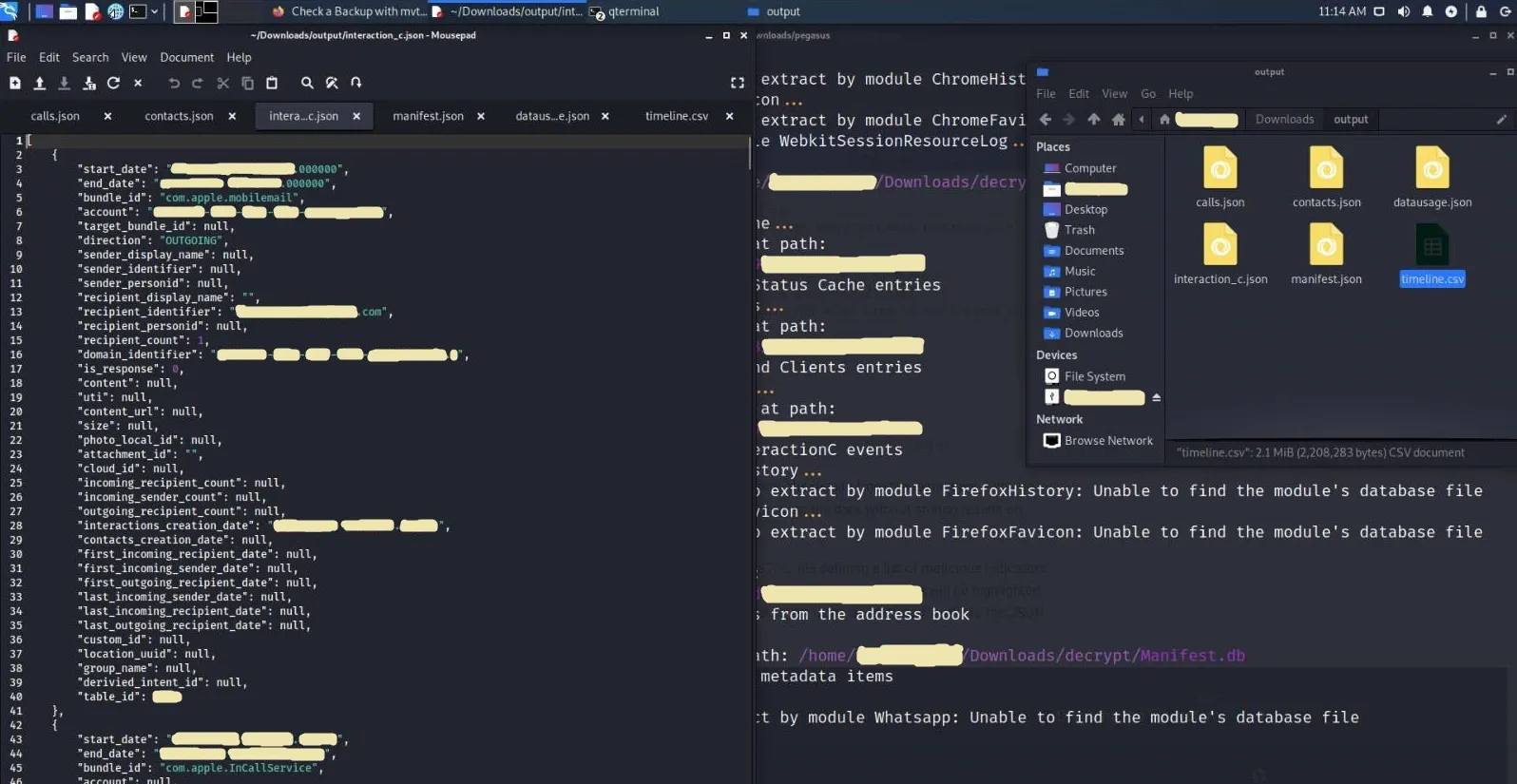
mvt-ios check-backup -i ~/Downloads/investigations/2021-07-18_nso/pegasus.strix2 -o ~/Downloads/output_forensics ~/Documents/decryptedMVT will systematically parse all databases. If a signature matching a malicious request, process, or SMS payload is detected, a critical warning output will be displayed in your terminal.
Digital Forensics on Android Devices
Forensics on Android devices is challenging due to the fragmented nature of the operating system. MVT utilizes two primary detection vectors: APK file integrity checking and telephony database parsing.
1. APK Integrity & Reputation Verification
Malevolent applications on Android often masquerade as benign utilities. MVT can extract installed packages directly from the device and cross-reference their cryptographic hashes against global threat intelligence networks.
- Enable USB Debugging within the Developer Options menu of the target Android device.
- Connect the device via USB to your forensic workstation, authorizing the ADB keys on the mobile screen.
- Create an output folder and download all active system and user APK binaries:
mkdir -p ~/Downloads/output_forensics
mvt-android download-apks -o ~/Downloads/output_forensics- To automatically query the SHA256 hashes of all extracted applications against the VirusTotal database, execute the extraction with the API flag:
mvt-android download-apks -o ~/Downloads/output_forensics --virustotal2. Telephony & SMS Database Analysis
Pegasus often initiates infection vectors via malicious SMS messages containing specialized links.
- Trigger a backup of the system’s telephony provider database using ADB:
adb backup com.android.providers.telephony- Authorize the backup transfer on the target device’s screen. The database will be stored locally as an Android Backup file (
backup.ab). - To read the
.abarchive, extract its contents using the Java-based Android Backup Extractor (ABE) tool:
java -jar ~/Downloads/abe.jar unpack backup.ab backup.tar
tar -xvf backup.tar- Scan the parsed telephony database for suspicious links matching the Pegasus infrastructure:
mvt-android check-backup -o sms .(Optionally, use the -i flag to point to specific IOC definitions file).
Forensic Ledger: Analyzed Core iOS Artifacts
Upon parsing, MVT exports granular JSON files detailing the states of critical system databases. Understanding these files is essential for mapping an exploitation timeline.
| Generated Artifact | Source System Path | Technical Forensic Significance |
|---|---|---|
cache_files.json | *Library/Caches/ SQLite databases | Extracts HTTP/HTTPS request headers and responses. Critical for identifying the initial zero-click download triggers. |
calls.json | /private/var/mobile/Library/CallHistoryDB/CallHistory.store | Historical log of all telephony events, including VoIP records from third-party secure applications (e.g., WhatsApp, Signal). |
chrome_favicon.json | *Library/Application Support/Google/Chrome/Default/Favicons | Parses website favicons. Helpful in tracking hidden web redirections triggered silently (learn more about favicon hijacking vulnerabilities on YouTube). |
chrome_history.json | *Library/Application Support/Google/Chrome/Default/History | Database of all website interactions conducted within the Chrome web browser. |
contacts.json | /private/var/mobile/Library/AddressBook/AddressBook.sqlitedb | Raw SQLite table containing system contacts. Often target vectors for database harvest. |
id_status_cache.json | /private/var/mobile/Library/Preferences/com.apple.identityservices.idstatuscache.plist | Tracks historical system validation of Apple IDs, biometric authentication tokens, and keys. |
interaction_c.json | /private/var/mobile/Library/CoreDuet/People/interactionC.db | High-value database monitoring low-level background system events and user interaction telemetry. |
locationd_clients.json | /private/var/mobile/Library/Caches/locationd/clients.plist | Cache of all processes and applications that requested active GPS device locations. |
manifest.json | Manifest.db (iTunes Backup database) | Acts as the file allocation registry for iTunes backups, mapping target device files to local backup hashes. |
safari_history.json | /private/var/mobile/Library/Safari/History.db | Exhaustive history of web searches, redirects, and visits performed using the native Safari browser. |
sms.json | /private/var/mobile/Library/SMS/sms.db | Contains all parsed text messages, filtered specifically for embedded URLs to identify phishing payloads. |
version_history.json | /private/var/db/analyticsd/Analytics-Journal-*.ips | Analytical journals tracking historical OS system updates, patch levels, and kernel configurations. |
whatsapp.json | *ChatStorage.sqlite | Decrypted WhatsApp chat logs showing message records and embedded HTTP hyperlinks. |
Conclusion & Security Recommendations
The threat posed by spyware platforms like Pegasus highlights the urgent need for a shift in how we approach mobile security. Standard sandboxing and application permissions are no longer sufficient to stop state-sponsored actors utilizing zero-click kernel exploits.
Core Mobile Hardening Best Practices
- Reduce Attack Surfaces: Disable services that process unsolicited incoming files. On modern iOS devices, enabling Lockdown Mode blocks highly sophisticated web technologies, raw graphic parsing, and sandbox-bypassing attachments by default.
- Regular Device Restarts: Since many zero-click exploits rely on volatile memory execution to maintain stealth, regularly rebooting the device can break exploit chains and disrupt persistent execution.
- Perform Routine Forensic Audits: For high-risk individuals, routinely extracting system backups and analyzing them with tools like MVT is a vital step in proactive threat detection.
- Adopt Secure Hardware & Operating Systems: Transitioning to privacy-hardened operating systems (such as GrapheneOS on Android, or standard hardware like the Nokia 8110 4G running GerdaOS) significantly improves device resilience against zero-click exploits. For a broader political and human rights perspective on Pegasus, watch Edward Snowden’s insightful interview with The Guardian.
This digital forensics walkthrough is intended solely for educational and diagnostic purposes, demonstrating how to audit mobile devices for suspected intrusion indicators and promote proactive threat intelligence.