
Three cities, an entire fictional state of connecting countryside, and zero loading screens — all running on a console with 32MB of system RAM and a video memory budget smaller than a single uncompressed 4K photograph. That was the engineering brief, implicit or otherwise, behind Rockstar North’s Grand Theft Auto: San Andreas in 2004, and it forced a small team of low-level programmers to treat the PlayStation 2 less like a game console and more like a real-time embedded system with a hostile storage medium bolted on the side.
This isn’t a retrospective about the game’s writing or its soundtrack. It’s a breakdown of the plumbing: the asynchronous streaming pipeline, the LOD hierarchy that hides mechanical disk latency, the hand-rolled Vector Unit microcode that bypassed the compiler entirely, and the indexed-color memory tricks that made a 4MB video memory budget stretch across an entire state. Some of the exact internal constants Rockstar used were never published and have only been approximated by the reverse-engineering community over the last two decades — where that’s the case, I’ve flagged it. The architecture, however, is well documented, and it’s a masterclass in constraint-driven engineering.
1. The 2004 Hardware Crisis & The Paradox
The PlayStation 2’s Emotion Engine addressed 32MB of Direct RDRAM as its main system memory — code, AI state, physics, audio buffers, streamed geometry, and textures in flight, all fighting for the same pool. The Graphics Synthesizer, the PS2’s rasterizer, worked from a separate 4MB of embedded DRAM (eDRAM) sitting directly on the GPU die, which had to hold the frame buffer, the Z-buffer, and every texture actively bound for rendering at once. There was no unified memory architecture and no virtual texture paging in the modern sense — if an asset wasn’t physically resident in one of those two pools, it did not exist to the renderer.
The real bottleneck wasn’t RAM — it was the drive. A 4x-speed DVD-ROM delivers a theoretical sequential transfer rate of about 5.28 MB/s ( for a single-speed DVD reader). But sequential throughput is the best case. Optical drives of this generation paid a heavy penalty — commonly cited in the ballpark of 100–200ms — every time the read head had to seek to a non-contiguous sector. A single seek could burn through six or more frames’ worth of the game’s time budget.
That time budget was unforgiving. At a 30 FPS target, the engine had:
to update simulation, run animation and physics, issue draw calls, and keep the streaming pipeline fed — all without a hitch the player could feel. If you naively multiply the drive’s best-case sequential rate by that per-frame window, you get a theoretical per-frame data ceiling:
That number is optimistic to the point of being fictional in practice, because it assumes zero seek overhead — a condition that essentially never holds once the player is driving through a city, jumping between sectors of the disc layout in a pattern nothing like the file’s linear order. The entire design problem for San Andreas’s engine team boiled down to one question: how do you hide a storage device that can stall for hundreds of milliseconds, inside a game loop that has 33 milliseconds to spare?
The objective was uncompromising: seamless streaming across the state, with world traversal that never once dropped to a loading screen — something no open-world console game had attempted at this geographic scale before.
2. Asset Streaming: Vectorizing and Segmenting San Andreas in Real Time
San Andreas licensed RenderWare, Criterion’s cross-platform rendering middleware, but only the low-level RenderWare Graphics rasterization layer — not Criterion’s higher-level scene management, audio, physics, or AI modules. Rockstar North built their own scene graph, occlusion scheme, LOD system, and streaming engine entirely in-house, sitting on top of RenderWare’s rendering primitives rather than inside them. “Heavily customized RenderWare” is, in a very literal sense, an understatement: large parts of what people call “the RenderWare engine” in San Andreas were Rockstar’s own code wearing RenderWare’s rasterizer as a back end.
The world itself was partitioned into a 2D grid of scene sectors — discrete spatial cells, each owning the set of models, collision data, and textures that physically belong to that patch of the map. Every frame, the engine checks the player’s world-space position against sector boundaries; crossing into a new sector triggers a streaming request for that sector’s resource set. A background counter — effectively a running tally of “streaming memory in use” — tracks how much of the RAM budget is currently committed to loaded assets. When that counter approaches its ceiling, the engine starts evicting the least relevant resident objects: things far from the camera, out of the view frustum, or simply furthest from the player, freeing room before the new sector’s data lands.
This is a classic least-relevant eviction cache policy, not LRU. Distance and visibility, not recency, decide what gets purged — which matters enormously in an open world where the player can turn around and double back through a sector they just abandoned.
The trigger radius for a streaming request isn’t a fixed circle around the player — it has to account for how fast the player is closing the distance to unloaded geography. A player on foot and a player piloting a Hydra jet at full throttle present wildly different lookahead requirements. Conceptually (Rockstar’s exact tuning constants were never published, so treat this as an illustrative model of the mechanism rather than their literal source), the streaming radius scales with velocity:
where is the minimum bubble radius needed at walking pace, is the magnitude of the player’s current velocity vector, and is a tuning constant that widens the bubble as speed increases. A more predictive variant projects a future position along the current heading and centers the load request there instead of on the player’s current coordinate:
This is the difference between an engine that reacts to the player entering new territory and one that anticipates it — and given DVD seek latency measured in hundreds of milliseconds against a 33.3ms frame budget, reacting was never going to be fast enough. The Hydra’s terminal velocity essentially forces the streaming system to start fetching geography seconds before the player arrives, or the world runs out from under them.
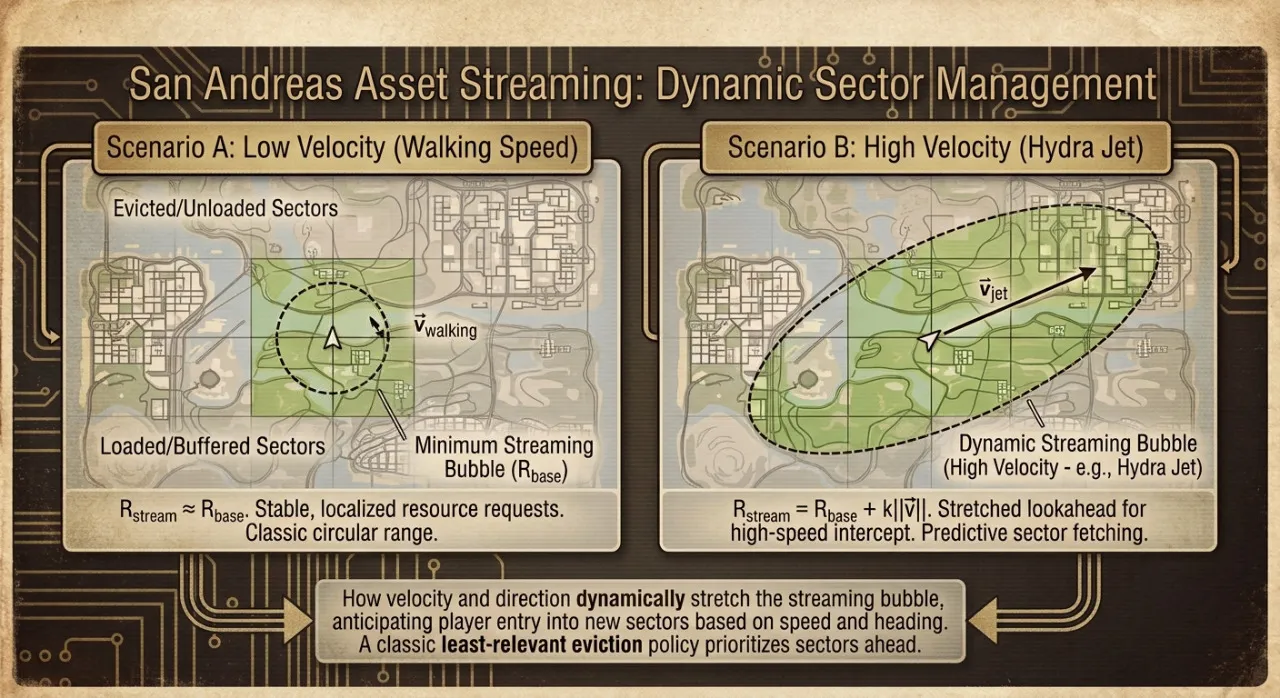
Figure 1: The relationship between the scene-sector grid and the dynamic streaming bubble. At low velocity the load radius is roughly circular; at high velocity it stretches ahead of the player’s heading, prioritizing sectors the player is about to enter over ones already behind them.
3. Mitigating Storage Latency: LOD Hierarchies & The “Pop-in” Resolution
Even with a predictive streaming bubble, physics wins in the end: a jet moving fast enough can outrun the disc. This is the root cause of San Andreas’s infamous “pop-in” — full-detail buildings, bridges, and trees snapping into view a beat after they should have already been there, because the DVD simply couldn’t deliver full-resolution geometry in time.
Every time a player witnessed a suspension bridge or a clump of high-detail trees suddenly materialize out of thin air directly in front of their fast-moving vehicle, they weren’t just looking at a software glitch — they were witnessing the mechanical limits of 2004 hardware. Inside the PlayStation 2 console, the physical laser head of the DVD drive was frantically sweeping back and forth across the spinning disc. To fetch the high-resolution textures and 3D meshes for a new neighborhood, that laser head had to physically reposition itself, taking up to 200 milliseconds to land on the correct sector. While the laser was flying across the disc, the game loop was still ticking at 33.3 milliseconds per frame. Rather than freezing the entire game to wait for the laser to catch up, the engine chose to keep running — rendering either an empty space or a blocky placeholder.
The mitigation wasn’t to eliminate the problem — that was physically impossible with a 5.28 MB/s optical drive — but to make the transition as seamless as possible. The core mechanism is a persistent, low-polygon proxy model — a coarse, “always resident” version of distant geography — that stays in memory regardless of streaming state. When the high-detail version of a building or landmark finishes loading, the engine swaps it in for the low-poly stand-in. Because there is always something on screen — just not always the final-quality asset — the visual pipeline degrades gracefully into a lower-detail placeholder instead of catastrophically dropping to an empty, unrendered void.
Hysteresis prevents thrashing. If an engine used a single distance threshold to decide when to swap between LOD tiers, an object hovering exactly at that boundary — which happens constantly when driving at a constant radius from a landmark — would flicker between models every frame. San Andreas-era engines solved this with two thresholds instead of one: a farther distance to downgrade to the low-poly model, and a nearer distance to upgrade back to full detail, creating a dead zone where nothing swaps. The swap itself is typically softened further with an alpha cross-fade across a handful of frames, so even the transition that does happen reads as a blend rather than a hard cut.
The interesting part is what this buys the engine, expressed in the frame budget itself: the low-poly proxy layer has effectively zero dependency on DVD latency because it never leaves memory, which means the worst-case visual output of the renderer is always “correct but low-fidelity,” never “missing.” That reframes the DVD’s seek latency from a correctness problem into a pure quality-of-service problem — exactly the kind of failure domain a real-time system wants to be operating in.
4. Assembly Magic: Exploiting the Emotion Engine & Vector Units
The PlayStation 2’s CPU complex — Sony and Toshiba’s “Emotion Engine” — is architecturally asymmetric in a way that has no clean modern analogue. At its center sits a 128-bit MIPS R5900 core clocked at roughly 294.912 MHz, running general game logic. Bolted onto that core are two Vector Units, VU0 and VU1, each a small SIMD processor built around 128-bit registers optimized for 4-wide float vector math — the exact shape of data used in 3D transforms, quaternion math, and physics integration.
VU0 operates tightly coupled to the main core, effectively as a coprocessor extension of the CPU’s own instruction stream, and was the natural home for latency-sensitive, gameplay-adjacent vector math: vehicle suspension modeling, per-frame collision response, ragdoll-adjacent physics work — anything that needed to talk back and forth with game logic on the same clock cycle. VU1 is a different animal entirely: it has its own local instruction and data memory and can run autonomously, executing its own microprogram in parallel with the main CPU rather than waiting to be spoon-fed instruction by instruction. Crucially, VU1 has a private, high-priority bus straight to the Graphics Synthesizer — “Path 1” in PS2 terminology — driven by a single instruction, XGKICK, that kicks a burst of transformed, lit, and clipped geometry directly at the GPU without round-tripping through the main CPU or system RAM bus at all.
Why hand-write VU assembly instead of trusting the compiler? VU0 and VU1 execute two instruction slots per cycle — an “upper” slot for vector arithmetic and a “lower” slot for things like memory access or branching — and getting real throughput out of that pipeline meant manually co-scheduling instruction pairs, managing a tiny local register file, and hiding fixed-latency pipeline stalls by hand. Compilers of the era were not reliably good at this kind of dual-issue, latency-hiding instruction scheduling on an architecture this unusual. Studios that wanted to actually hit the PS2’s advertised vertex-transform throughput — commonly cited in the tens of millions of vertices per second when VU0 and VU1 worked in tandem — routinely dropped to raw VU microcode for the hottest inner loops: skinning, matrix palette transforms, frustum culling, clip-space projection.
The resulting pipeline looks roughly like this: the main CPU (with VU0 assisting) updates game state and physics for the frame, VU1 consumes the results and independently grinds through matrix transforms, lighting, and clip-space culling for the geometry that survived visibility tests, and the finished, GPU-ready primitives get fired at the Graphics Synthesizer over Path 1 while the CPU has already moved on to the next chunk of work. It’s software-pipelined parallelism squeezed out of fixed-function-adjacent hardware, years before “compute shader” was a term anyone used.
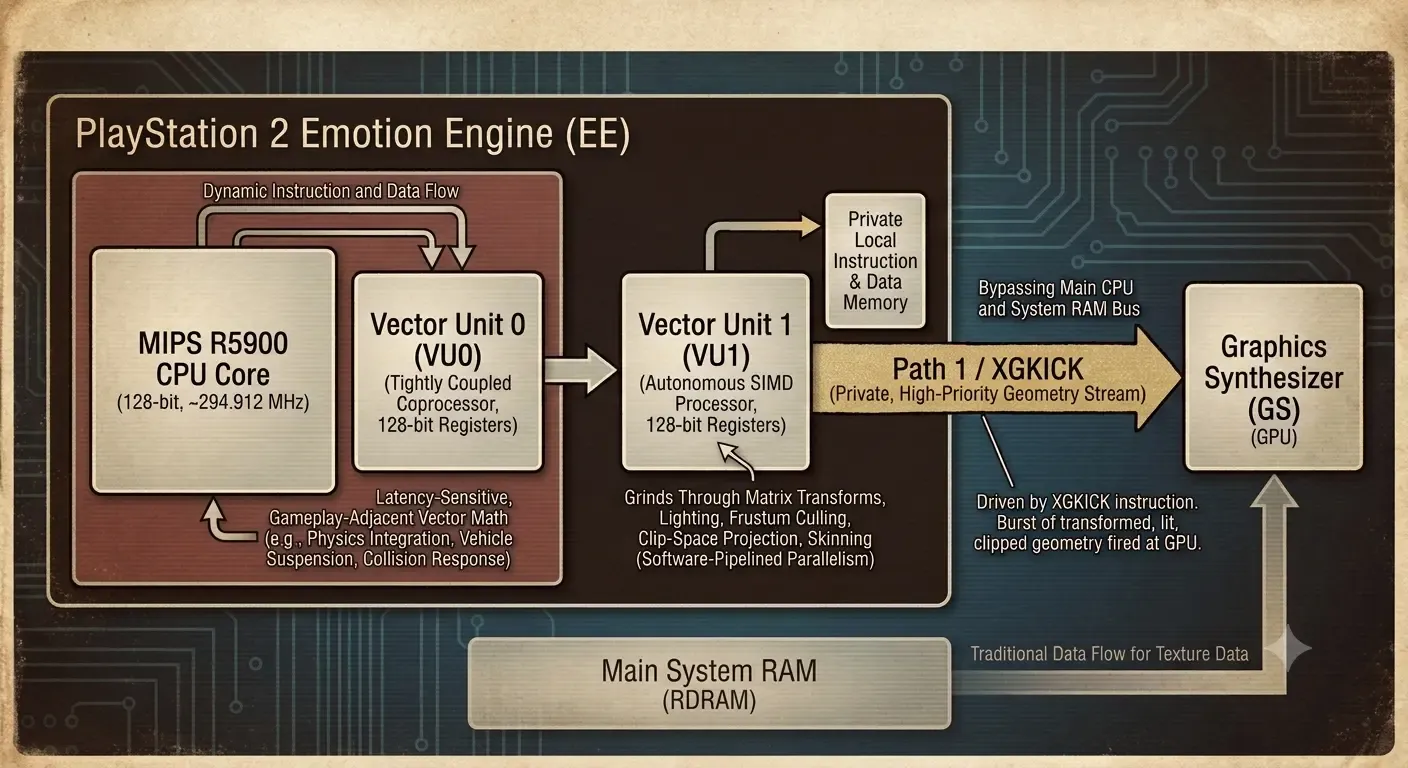
Figure 2: Data flow through the Emotion Engine. VU0 stays close to the CPU for gameplay-coupled physics math, while VU1 runs semi-autonomously and streams finished geometry to the GS over the dedicated Path 1 bus via the XGKICK instruction — never touching the main system RAM bus.
5. Memory Economy: CLUT Texturing & Procedural Entity Recycling
With only 4MB of eDRAM to hold every texture actively bound during a frame, San Andreas leaned hard on indexed color — Color Look-Up Tables, or CLUTs — for the overwhelming majority of its environment art. Instead of storing a full 32-bit RGBA color per pixel, an indexed texture stores a small integer index per pixel, and a separate, tiny palette table maps each index to an actual 16-bit color. The PS2’s Graphics Synthesizer natively supported two indexed depths: 4-bit (16 possible colors per texture) and 8-bit (256 possible colors per texture).
The savings are dramatic and scale-invariant — they hold at essentially the same percentage regardless of texture resolution, because the palette overhead is negligible compared to the pixel data itself:
| Texture Size | Format | Pixel Data | Palette (CLUT) | Total Size | Savings vs. 32-bit RGBA |
|---|---|---|---|---|---|
| 128×128 | 32-bit RGBA | 64 KB | — | 64 KB | — |
| 128×128 | 8-bit indexed (256 colors) | 16 KB | 0.5 KB | 16.5 KB | ~74.2% |
| 128×128 | 4-bit indexed (16 colors) | 8 KB | ~0.03 KB | ~8.03 KB | ~87.4% |
| 256×256 | 32-bit RGBA | 256 KB | — | 256 KB | — |
| 256×256 | 8-bit indexed (256 colors) | 64 KB | 0.5 KB | 64.5 KB | ~74.8% |
| 256×256 | 4-bit indexed (16 colors) | 32 KB | ~0.03 KB | ~32.03 KB | ~87.5% |
Palette sizes assume a 16-bit color entry per index: 256 entries × 2 bytes = 512 bytes for 8-bit CLUTs, 16 entries × 2 bytes = 32 bytes for 4-bit CLUTs.
The formula behind the pixel-data column is simple bit-packing math. For a texture of pixels at bits per pixel:
which is why dropping from 32 bits per pixel to 4 bits per pixel isn’t a linear saving — it’s an 8x reduction in raw pixel storage, since .
CLUT indexing has a second, subtler payoff beyond raw storage: because every pixel in an indexed texture is just a pointer into a small palette, you can radically change how a texture looks by rewriting only the palette — a few dozen or a few hundred bytes — without touching a single byte of the (much larger) pixel data. Swap, rotate, or fade the palette entries and every pixel referencing them updates instantly and uniformly. This “palette shifting” technique, well established in indexed-color graphics going back to 8-bit-era hardware, is exactly the kind of trick that makes near-zero-VRAM-cost lighting shifts — the color grading a scene needs as San Andreas’s day-night cycle moves environment textures from harsh noon light toward amber dusk tones — practical at console scale: re-uploading a handful of palette bytes is orders of magnitude cheaper than re-uploading or re-blending full-resolution texture data every frame.
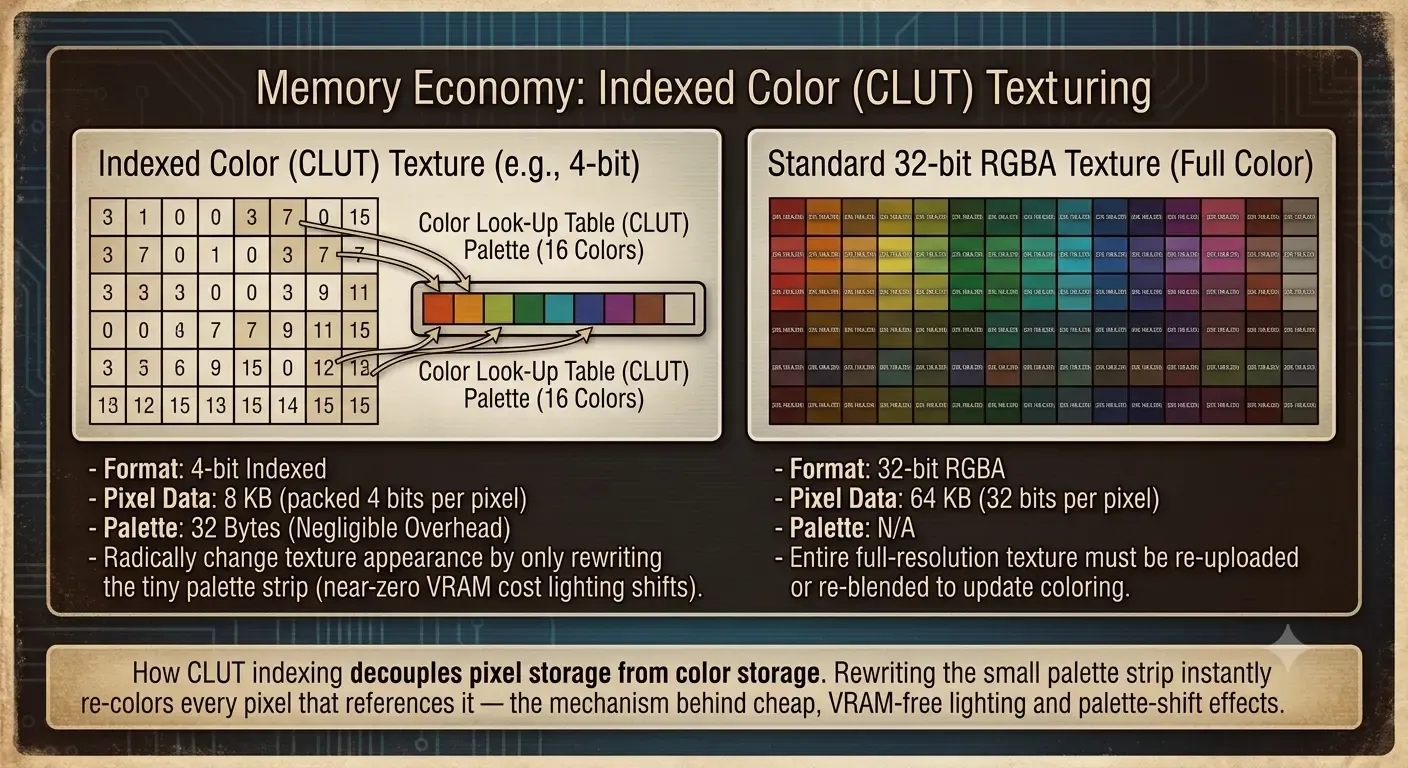
Figure 3: How CLUT indexing decouples pixel storage from color storage. Rewriting the small palette strip instantly re-colors every pixel that references it — the mechanism behind cheap, VRAM-free lighting and palette-shift effects.
Memory economy on the CPU side of the RAM budget worked on the same philosophy: don’t store what you can regenerate. San Andreas’s population of pedestrians and traffic wasn’t a fixed set of persistent actors — it was a procedurally managed pool, spawned and despawned dynamically as the player moved through the world, bounded by deterministic zone-weighted tables that biased which models could spawn in which district (lowrider-styled vehicles clustering in Ganton, sports cars concentrated around Las Venturas, and so on). Spawning was gated by the view frustum — new entities materialize just outside the camera’s field of view rather than anywhere in the loaded world — and despawning was equally aggressive: anything that left the frustum and drifted far enough from the player was purged from the active heap immediately, rather than lingering as dead weight against the RAM budget. The entire system behaves like a fixed-capacity object pool with a spatial and statistical policy layered on top, which is precisely what you need when your simulated population has to compete for memory against streamed geometry, textures, and audio — all inside the same 32MB ceiling.
6. Conclusion: The Triumph of Constraint-Driven Architecture
When we look back at Grand Theft Auto: San Andreas through a modern lens, it becomes clear that the game’s vast, seamless world was not a product of hardware muscle, but an illusion sustained by brutal microcode, aggressive caching, and highly structured memory budgeting. The 32MB of system RAM and the 4MB of eDRAM did not limit Rockstar North’s vision—in a paradoxical way, those rigid boundaries defined the clean, predictable engineering framework that made the game possible.
The streaming engine didn’t just load assets; it orchestrated a real-time dance against the mechanical physical limits of a spinning laser head. The Vector Units didn’t just transform vertices; they bypassed high-level software abstractions to extract raw execution parallelism directly from the silicon.
In an era where modern web and game development frequently layers abstraction upon abstraction—often leading to massive deployment footprints and unoptimized runtime environments—San Andreas stands as a masterclass in bare-metal systems engineering. It is a reminder that when hardware gives you nothing for free, the ultimate optimization tool is a deep, uncompromising understanding of the bare metal. The state of San Andreas was never actually stored on that dual-layer DVD; it was engineered into existence, frame by 33-millisecond frame.
References & Further Reading
- Copetti, R. (2018). PlayStation 2 Architecture: A Practical Analysis. A deep dive into the Emotion Engine, Vector Units, and Graphics Synthesizer pipelines.
- Criterion Software. (2002). RenderWare Graphics SDK Documentation. Structural specifications and community-preserved details of the low-level rasterization layer.
- GTA Modding Community. GTA:SA Memory Addresses & Resource Streaming Documentation. Community-driven reverse engineering wiki detailing
.ipl,.idestructures and memory streaming constants. - The re3 & reVC Projects. Open-source decompilation of RenderWare-era GTA engines (and preserved Internet Archive Torrent). Fully reversed original source code mapping engine structures, memory pooling, and entity recycling routines.
Technical Glossary
| Term | Definition |
|---|---|
| Emotion Engine (EE) | The PS2’s main CPU: a 128-bit MIPS R5900 core (~294.912 MHz) paired on-die with two Vector Units (VU0, VU1) and a floating-point unit, purpose-built for real-time 3D simulation. |
| RDRAM | Direct Rambus DRAM — the PS2’s 32MB main system memory, delivering roughly 3.2 GB/s of bandwidth, shared by code, game state, and all streamed assets. |
| eDRAM | Embedded DRAM built directly onto the Graphics Synthesizer die — a separate, much faster but far smaller (4MB) memory pool holding the frame buffer, Z-buffer, and actively bound textures. |
| Graphics Synthesizer (GS) | The PS2’s dedicated rasterization GPU. Fixed-function, no programmable shaders; consumes pre-transformed geometry and textures and outputs pixels. |
| VU0 | A Vector Unit tightly coupled to the EE core as a coprocessor, typically used for gameplay-coupled math like physics and suspension modeling that needs to interleave with CPU logic every cycle. |
| VU1 | A second, more autonomous Vector Unit with its own local memory, typically dedicated to geometry transforms, lighting, clipping, and culling ahead of the GS. |
| GIF (Graphics Interface) | The hardware interface arbitrating data delivery into the GS from three priority “Paths,” ensuring geometry and texture data reach the rasterizer in the correct order. |
| Path 1 / XGKICK | The highest-priority bus route from VU1 directly to the GS, triggered by the XGKICK instruction — lets VU1 push finished geometry to the GPU without going through main RAM. |
| CLUT (Color Look-Up Table) | A small palette table paired with an indexed texture; each pixel stores a compact index rather than a full color, and the CLUT maps indices to actual color values. |
| Palette Shifting | Rewriting a texture’s CLUT palette (a few dozen to a few hundred bytes) to change the apparent color of every pixel referencing it, without touching the underlying pixel data. |
| LOD (Level of Detail) | A lower-polygon, lower-fidelity substitute model kept resident so the renderer always has something to draw for distant or not-yet-streamed geometry. |
| Hysteresis (LOD swapping) | Using two distinct distance thresholds — one to downgrade, one to upgrade — instead of one, to prevent an object near a boundary from flickering between LOD tiers every frame. |
| Streaming Sector | A discrete grid cell of the game world that owns a bounded set of geometry, collision, and texture resources, used as the atomic unit of the streaming system’s load/unload decisions. |
| Streaming Bubble | The dynamic radius around the player within which the engine proactively requests sector data, scaled by the player’s velocity vector to compensate for DVD seek latency. |
| DVD-ROM (4x) | The PS2’s optical storage medium; roughly 5.28 MB/s theoretical sequential throughput, with seek latency (commonly cited in the range of 100–200ms) representing the true bottleneck for non-contiguous reads. |
| Frustum Culling | Discarding geometry that falls outside the camera’s current field of view before it’s sent to the GPU, saving both transform and fill-rate cost. |
| RenderWare Graphics | The low-level 3D rasterization middleware (by Criterion Software) that San Andreas built on; Rockstar North’s own custom scene management, streaming, and LOD systems sat on top of it rather than inside it. |